
PIQSY Picks
Best Tablets Australia 2026
Compare tablets for everyday use, study, note-taking, gaming and work, with clear advice on operating systems, screen sizes and accessories.
The decision this guide answers
Which tablet best fits what you need it to do?
Which tablet suits you?
The best tablet depends on what you want to do with it. A compact iPad for daily use, a pen-friendly tablet for study, a larger Android screen for work and a Windows tablet for desktop software solve different needs.
Start with your essential software, screen size and accessories. Then explore the 20 recommended tablets below, grouped by how you plan to use them.
Check these essentials first
Some needs can rule out a tablet before you compare prices:
- Operating system: Choose iPadOS if you rely on iPad apps. If you need full Windows desktop software, look at Surface Pro and verify any specialist apps or drivers work with its ARM platform.
- Pen and keyboard: Check the exact bundle. Some Samsung and Lenovo packages include a pen, while Apple accessories and many keyboards are separate purchases.
- Mobile internet: If you need 5G away from Wi-Fi, check the exact configuration. The Lenovo Idea Tab Plus package reviewed here combines 5G, pen and keyboard.
- Size and comfort: Small tablets suit handheld use. A 13–14.6-inch screen provides more room but makes less sense if you need a device you can hold easily.
- Reading or gaming: A reduced-glare display and compact gaming features serve different needs; choose the one you will use.
PIQSY Picks by tablet type
Choose a category. Its recommended tablets will appear directly below.
Showing Apple iPads recommendations below
Apple iPads
4 reviewedMainstream iPad

Everyday Apple tablet buyers who prioritise a broad app ecosystem, straightforward study/media use and a lower entry price than iPad Air or Pro.
Main trade-off: Pencil and keyboard are separate purchases, and you need to step up to Air for Apple Pencil Pro or Apple Intelligence.
Compact general-purpose iPad

Buyers who prioritise a genuinely compact iPad for reading, travel, handheld notes or field use while still wanting A17 Pro performance and Apple Pencil support.
Main trade-off: The small canvas is less comfortable for sustained multitasking or large documents, Pencil is separate and storage cannot be expanded by microSD.
Apple productivity step-up

iPad buyers who want a lighter productivity and creative step above the base iPad, especially when Pencil Pro, Apple Intelligence or stronger external-display workflows matter.
Main trade-off: Pencil and keyboard remain separate, 128GB is fixed with no microSD, and the extra headroom can be wasted on basic tablet work.
Pro display and I/O

Professional and enthusiast iPad buyers who can use the M5 platform, Tandem OLED display, Thunderbolt workflow, Pencil Pro or other Pro-specific capability rather than simply wanting the highest-tier iPad.
Main trade-off: The 256GB reference uses standard glass and 12GB RAM, accessories cost extra, and many everyday iPad workloads do not need the Pro hardware.
Samsung tablets
4 reviewedSimple included-S-Pen route

Study, note-taking and mainstream Android buyers who value an S Pen in the box and expandable storage without needing the stronger FE or flagship Galaxy Tab platform.
Main trade-off: The version reviewed here has 6GB RAM, a TFT panel and USB 2.0, so buyers needing stronger performance, durability or wired workflow should step up.
Balanced Samsung all-rounder

Students, note-takers and mainstream Android buyers who want an included S Pen, expandable storage and IP68 durability with more performance headroom than the S10 Lite without moving to Samsung's flagship tablet tier.
Main trade-off: The display remains TFT, USB is 2.0, the keyboard is optional and the version reviewed here is Wi-Fi only.
Portable Samsung flagship

Android flagship buyers who specifically value Dynamic AMOLED 2X/120Hz display quality, stronger wired connectivity, Samsung DeX, bundled S Pen and IP68 durability in an 11-inch portable format.
Main trade-off: The keyboard is optional, this is the Wi-Fi version, and simpler study or browsing may not justify the flagship upgrade.
14.6-inch premium Android workspace

Samsung power users who will genuinely use a 14.6-inch AMOLED workspace for multi-window productivity, drawing, DeX or desk-based media and accept the 692g portability trade-off of the Ultra format.
Main trade-off: The 692g tablet-only weight and 14.6-inch footprint are a serious portability cost, while keyboard and charger remain separate purchases.
Lenovo tablets
4 reviewedPaper-like study value

Students, readers and mainstream Android buyers who value a matte paper-like display, pen-in-package study workflow and expandable storage more than high-end performance.
Main trade-off: The exact model has only 4GB RAM, USB 2.0 and Wi-Fi 5, with the keyboard remaining optional.
5G pen + keyboard bundle

Students and productivity-focused Android buyers who want a larger paper-like display, 12GB/256GB, expandable storage, 5G, a pen and a folio keyboard in the exact Australian package.
Main trade-off: USB-C is limited to USB 2.0, and the larger tablet-plus-keyboard package is bulkier than simpler Wi-Fi study options.
Large matte pen workspace

Students, creators and Android productivity buyers who want a large matte high-refresh workspace, substantially more performance headroom, Pen Plus in the exact package and expandable storage without moving to a premium OLED tablet.
Main trade-off: At around 598g it is less handheld-friendly, the display is IPS rather than OLED, cellular is absent and the keyboard is optional.
Complete premium Android bundle

Android productivity buyers who want a high-memory 16GB/512GB tablet with both pen and keyboard included in the exact Australian package for a more complete desk-and-creative setup.
Main trade-off: It is around 640g before the keyboard, has no microSD or cellular on the version we checked, and the premium bundle is excessive for basic tablet use.
Performance Android
2 reviewedPortable Android performance

Android buyers who want a relatively portable 11.2-inch high-resolution 144Hz performance tablet with fast USB and optional pen/keyboard accessories, without moving to a larger 13-inch productivity tablet.
Main trade-off: Pen and keyboard are separate, storage is fixed, there is no cellular option and the Australian box does not include a power adapter.
Large-screen Android headroom

Premium Android buyers who want a very large high-refresh workspace, flagship-class Snapdragon performance, 16GB/512GB capacity and strong media hardware, while accepting that pen and keyboard are separate purchases.
Main trade-off: At 675g it is substantial to hold, while pen and keyboard are separate and the version reviewed here has fixed storage, LCD and Wi-Fi-only connectivity.
Compact gaming
2 reviewedCompact gaming specialist

Buyers who want a compact Android gaming-first tablet with flagship-class performance and high-refresh display hardware.
Main trade-off: Storage is fixed at 256GB with no microSD, the version we checked is Wi-Fi only, and the pen is supported but sold separately.
OLED gaming specialist

Compact gaming-first Android buyers
Main trade-off: Australian warranty/support depth and owner feedback for this model are less resolved than major local brands, while microSD and cellular are not established.
Windows tablets
2 reviewedPortable Windows tablet

Portable Windows 2-in-1 buyers who need desktop Windows applications
Main trade-off: Keyboard, pen and power supply are separate, USB4 is absent and specialised Windows software may need ARM compatibility checking.
Full-size Windows workspace
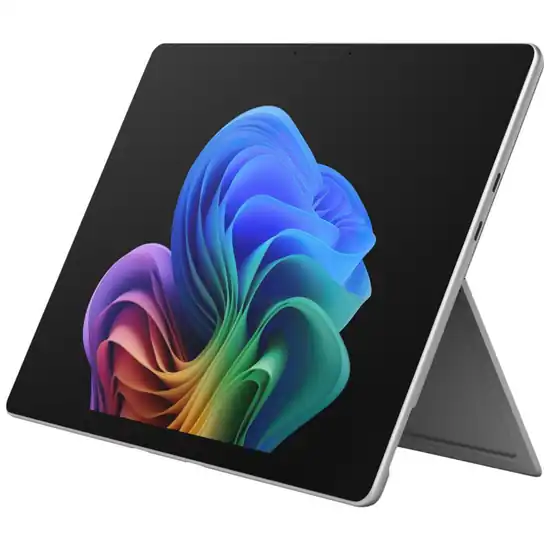
Windows 2-in-1 buyers who prioritise workspace, USB4 and higher performance headroom
Main trade-off: The tablet weighs 895g before keyboard, the version we checked is LCD rather than OLED, and keyboard and pen remain separate purchases.
Reading and smart home
2 reviewedLow-glare display specialist

Reading, PDF, study and note-taking buyers prioritising a low-glare paper-like display
Main trade-off: Helio G100 performance is midrange, there is no microSD or cellular path, and pen/case inclusion varies by retailer.
Docked smart-home specialist
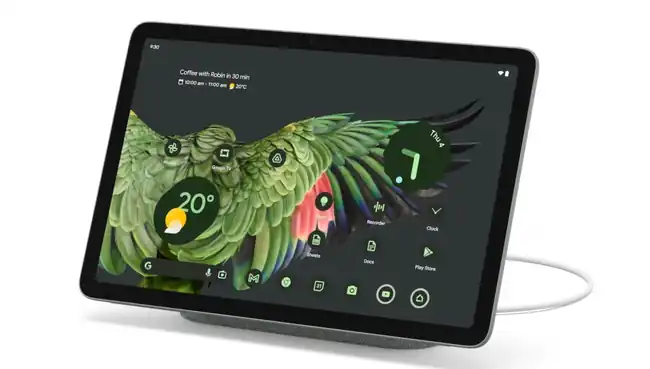
Android buyers who value a docked smart-home/display role as much as portable tablet use
Main trade-off: The dock is optional, storage is fixed, there is no cellular path, and Google currently carries an Australian repair/spare-parts availability caveat.
What matters when choosing a tablet
Software first. iPadOS, Android and Windows run different apps. Make sure the programs you need work on the model before considering its price or performance.
The full setup matters. A pen, keyboard or dock may transform how you use a tablet, but the accessory is not always included. Compare the cost and availability of everything you plan to use.
Screen size changes everyday comfort. Small tablets are easier to hold and carry. Larger ones make room for documents, drawing and multitasking, but can be awkward away from a desk.
Pay for features you will use. For browsing or streaming, the most expensive processor is rarely the deciding factor. For demanding creative work or external screens, check memory, ports and the exact model's supported features.
Apple iPads
iPad A16 — mainstream iPad starting point
Start with iPad A16 when the job is browsing, streaming, schoolwork, video calls, reading and mainstream apps. The model reviewed here starts at 128GB and supports Apple Pencil and Magic Keyboard Folio as separate accessories.
Its strength is proportion: many everyday buyers do not need an M-series iPad.
Buy it if
- You want an iPad for homework, video calls, browsing and streaming without premium extras.
- Your apps and files fit within the included 128GB, so extra storage is unnecessary.
- You'd prefer to add a compatible pen or keyboard later, only if you need one.
Skip it if
- You depend on advanced drawing tools or Apple Intelligence features this iPad lacks.
- You need mobile internet; the version reviewed connects through Wi-Fi only.
- You expect a pen or keyboard included in the tablet's price.
Read the Apple iPad (A16) Verdict .
iPad mini A17 Pro — compact general-purpose iPad
Choose iPad mini A17 Pro when compactness is the reason for buying but you still want a current, capable iPad rather than an entry-level small tablet.
Its 8.3-inch display and 293g Wi-Fi weight make it materially easier to hold and carry. It supports Apple Pencil Pro, but the Pencil is separate and the smaller canvas is a poor fit for sustained split-screen or keyboard-heavy work.
Its compact size makes it an alternative to smaller tablets designed mainly for gaming.
Buy it if
- You read or check notes while commuting and want something comfortable to hold.
- You carry your tablet everywhere and value its genuinely small, lightweight design.
- You want to sketch or handwrite notes using a compatible pen bought separately.
Skip it if
- You regularly work across two apps or edit large documents on screen.
- You need a pen included or storage you can expand later.
- Your tablet mostly stays on a desk, where a larger screen would be more useful.
Read the Apple iPad mini (A17 Pro) Verdict .
iPad Air M4 — capability-led Apple step-up
Move to iPad Air M4 when M4 performance, Apple Intelligence, Pencil Pro support, faster USB or stronger external-display capability changes the job.
For many serious students and creators, Air is the rational upper-middle iPad before Pro-specific hardware becomes necessary.
Buy it if
- You edit photos, draw or work across demanding apps often enough to need extra power.
- You want a more comfortable drawing surface and support for Apple's advanced pen.
- You frequently connect external storage or a monitor while working at a desk.
- You regularly use Apple Intelligence features unavailable on the entry-level iPad.
Skip it if
- You mostly browse, stream or do schoolwork and would rarely use the extra power.
- You need richer screen contrast or faster connections for demanding desk work.
- You need mobile data or expect a pen and keyboard included in the price.
Read the Apple iPad Air (M4) Verdict .
iPad Pro M5 — specialist display and I/O
Choose iPad Pro M5 when Tandem OLED, ProMotion, Thunderbolt/USB4 or another Pro-specific capability is genuinely part of the workflow.
Do not buy it simply because it is the highest iPad tier. The Air already covers a large amount of high-capability iPad work.
Buy it if
- You edit detailed images or HDR video and need the screen's richer contrast and colour.
- You value exceptionally smooth scrolling and drawing during long creative sessions.
- You often transfer large files or use demanding accessories through a fast wired connection.
Skip it if
- You mostly watch videos, browse or take occasional notes; its specialist features add little.
- You need less-reflective glass or more memory than this 256GB version offers.
- You need mobile internet or expect the pen and keyboard included in the purchase.
Read the Apple iPad Pro (M5) Verdict .
Samsung tablets
Galaxy Tab S10 Lite — simple included-S-Pen route
Choose Galaxy Tab S10 Lite when handwritten notes and expandable storage matter more than premium display or wired I/O. The model reviewed here includes the S Pen and keeps the proposition straightforward.
Buy it if
- You take handwritten class or meeting notes and want the pen included from day one.
- You save plenty of lessons, PDFs or media and may need extra memory-card storage.
- You want a straightforward Samsung tablet for everyday apps rather than premium extras.
Skip it if
- You care most about deep blacks and rich contrast when watching films.
- You move large files through wired accessories and need a faster connection.
- You expect a typing keyboard or wall charger included in the box.
Read the Samsung Galaxy Tab S10 Lite Verdict .
Galaxy Tab S10 FE — balanced Samsung all-rounder
Choose Galaxy Tab S10 FE when you want the S Pen, microSD and Samsung workflow with more platform headroom and Samsung's IP68 proposition.
For many study and family buyers, this is the point where the Samsung package becomes broadly capable without becoming flagship-heavy.
Buy it if
- You take frequent notes and want to start writing without buying a separate pen.
- You value water and dust resistance for study, travel or shared family use.
- You want more space for apps and expandable storage without paying for flagship features.
Skip it if
- You choose screens mainly for richer contrast when watching films or editing images.
- You regularly connect fast storage or a dock for substantial desk work.
- You need mobile internet or an included keyboard; this package offers neither.
Read the Samsung Galaxy Tab S10 FE Verdict .
Galaxy Tab S11 — portable flagship Samsung
Choose Galaxy Tab S11 when the 11-inch AMOLED 120Hz display, USB 3.2, DeX and more room for multitasking are recurring requirements.
It is the option to consider when its extra features are genuinely useful, rather than an automatic upgrade over the FE.
Buy it if
- You want a vibrant, smooth-looking screen for videos, reading and everyday use.
- You regularly work with several apps and want a more desktop-like experience.
- You frequently transfer large files or use fast wired accessories.
- You handwrite notes or sketch and want a pen included.
Skip it if
- You mainly browse, stream and take occasional notes, so premium features may go unused.
- You need a much larger screen for desk-based document work.
- You need mobile internet or expect a typing keyboard included.
Read the Samsung Galaxy Tab S11 Verdict .
Galaxy Tab S11 Ultra — 14.6-inch premium Android workspace
Choose Galaxy Tab S11 Ultra only when the 14.6-inch workspace is itself valuable.
The reviewed 12GB/256GB Wi-Fi version combines Dynamic AMOLED 2X at 120Hz, DeX Extended Mode, included S Pen, USB 3.2, microSD and Wi-Fi 7 in a 692g tablet.
That is a coherent desk-first creative and productivity role. If you do not repeatedly use the extra screen area, the standard S11 is easier to justify.
Buy it if
- You regularly review large documents or draw and need plenty of room on screen.
- You work with several windows at a desk and want a spacious Android setup.
- You want a large, vibrant screen and an included pen for creative work.
Skip it if
- You often read standing or hold your tablet for long periods; this one is large.
- You need a typing keyboard included in the tablet's purchase price.
- You depend on Windows desktop software or mobile internet away from Wi-Fi.
Read the Samsung Galaxy Tab S11 Ultra Verdict .
Lenovo tablets
Idea Tab 11 — paper-like study value
Choose Lenovo Idea Tab 11 when reduced glare, reading comfort and a pen in the Australian package reviewed here matter more than high multitasking headroom.
Its 4GB RAM remains the reason to step away when the workload grows.
Buy it if
- You regularly read PDFs or study notes and want a screen with less distracting glare.
- You handwrite lessons or annotations and want the pen included in this package.
- You save plenty of documents or videos and want the option to add a memory card.
Skip it if
- You keep many demanding apps open; this version has limited memory for that workload.
- You frequently transfer large files or connect a more demanding desktop setup.
- You need mobile internet or a typing keyboard included in the box.
Read the Lenovo Idea Tab 11 Verdict .
Idea Tab Plus — complete 5G study and mobility package
Choose Lenovo Idea Tab Plus when you want a larger matte display, 12GB/256GB, 5G, Lenovo Tab Pen and Folio Keyboard in one exact Australian package.
The bundle is especially useful for students or mobile workers who would otherwise need to solve connectivity, pen and keyboard as three separate purchases.
The USB 2.0 connection is a drawback if you often transfer large files by cable; tablets with faster USB ports are better suited to that job.
Buy it if
- You work or study away from Wi-Fi and need built-in mobile internet.
- You regularly type and handwrite notes, with both keyboard and pen included.
- You review documents on a larger, lower-glare screen and want generous storage options.
Skip it if
- You prefer a small tablet for long handheld reading sessions.
- You regularly use fast wired drives or other demanding USB accessories.
- You rarely leave Wi-Fi or use a keyboard, so much of the bundle would go unused.
Read the Lenovo Idea Tab Plus 12.1 5G Verdict .
Idea Tab Pro Gen 2 — large matte Android workspace
Choose Idea Tab Pro Gen 2 when the priority is a 13-inch matte 3.5K 144Hz workspace with 12GB RAM, microSD, Pen Plus inclusion and stronger USB/DisplayPort capability.
It is a large study-and-productivity canvas without the extra weight and premium bundle of some higher-tier options.
Buy it if
- You annotate large PDFs or work in two apps and appreciate extra screen space.
- You take substantial notes and want the pen included without another purchase.
- You regularly connect a monitor or wired accessories while working at a desk.
Skip it if
- You mainly use your tablet in one hand while travelling.
- You need a typing keyboard included alongside the pen.
- You need mobile internet or deeper screen contrast for film and creative work.
Read the Lenovo Idea Tab Pro Gen 2 Verdict .
Yoga Tab Plus — complete premium Android productivity bundle
Choose Lenovo Yoga Tab Plus when you will actually use the complete package: 16GB/512GB, Pen Pro, 2-in-1 Keyboard Pack, 12.7-inch 144Hz display and USB 3.2 with DisplayPort.
Its reason to exist is not simply premium specifications. It is that the pen and keyboard workflow is complete from day one.
The trade-offs are around 640g before keyboard, no microSD and no cellular on the version checked.
Buy it if
- You often type and draw and want a complete pen-and-keyboard setup from day one.
- You keep large projects or multiple demanding apps open and need generous built-in storage.
- You regularly connect an external display or work on a spacious tablet screen.
Skip it if
- You mainly browse and stream, so the premium bundle offers little everyday value.
- You need mobile internet or want to expand storage with a memory card.
- You need backlit keys or a very light tablet for extended handheld use.
Read the Lenovo Yoga Tab Plus Verdict .
Performance Android
Xiaomi Pad 7 — portable performance
Choose Xiaomi Pad 7 when you want a high-refresh performance tablet but still care about carrying weight. Its 11.2-inch format and roughly 500g body make it the portable general-purpose performance route.
The Focus Pen and keyboard are separate.
Buy it if
- You want smooth scrolling and capable gaming without carrying a very large tablet.
- You move between study, entertainment and apps and want plenty of built-in storage.
- You frequently connect wired accessories and value faster file transfers.
Skip it if
- You need a pen or typing keyboard included rather than bought separately.
- You require mobile internet or the option to add a memory card.
- You mainly value deeper blacks and richer contrast when watching films.
Read the Xiaomi Pad 7 Verdict .
OnePlus Pad 3 — large-screen Android for demanding apps
Choose OnePlus Pad 3 when the 13.2-inch display, Snapdragon 8 Elite and 16GB/512GB version we checked are more useful than a lighter chassis.
It is a high-headroom Android tablet, but the stylus and keyboard are separate and storage is not expandable.
Buy it if
- You work across demanding apps and want plenty of screen space to multitask.
- You store large projects or media and value generous built-in memory and storage.
- You watch films or listen to music often and want an expansive screen with strong speakers.
Skip it if
- You often read while holding your tablet or prefer to travel light.
- You need the pen or keyboard included in the purchase price.
- You need mobile internet, expandable storage or richer contrast in dark scenes.
Read the OnePlus Pad 3 Verdict .
Compact gaming
Lenovo Legion Tab Gen 3 — compact specialist with the clearer Australian path
Choose Legion Tab Gen 3 when handheld gaming, an 8.8-inch form factor and a clearer Australian retail/support route matter.
Its gaming-specific cooling, high-refresh display and dual USB-C design give it a genuine specialist role.
Buy it if
- You prefer playing games while holding a small, lightweight tablet.
- You play demanding games regularly and value a responsive screen and dedicated cooling.
- You connect gaming accessories or an external display through its two USB-C ports.
Skip it if
- You spend more time on spreadsheets and large documents than games.
- You need mobile internet or storage that can expand with a memory card.
- You mainly want handwritten notes or the reassurance of extensive Australian owner reviews.
Read the Lenovo Legion Tab Gen 3 Verdict .
REDMAGIC Astra 2 — compact OLED gaming specialist
Choose REDMAGIC Astra 2 when its 9.06-inch OLED, very high refresh rate, newer flagship processor and dedicated cooling are reasons to buy.
Its Australian support and owner feedback picture remains thinner than Lenovo's, so that ownership caveat stays visible.
Buy it if
- You want a compact gaming screen with rich contrast and very smooth motion.
- You regularly play demanding Android games and value dedicated cooling hardware.
- You connect an external screen or gaming accessories through its two wired ports.
Skip it if
- You need a clearly established Australian warranty and repair pathway.
- You rely on extensive local owner reviews before making an expensive purchase.
- You need mobile internet or expect a wall charger included in the box.
Read the REDMAGIC Astra 2 Verdict .
Windows tablets
Surface Pro 12 — portable Windows tablet
Choose Surface Pro 12 when full Windows is essential but you prefer a smaller tablet. It uses Snapdragon ARM Windows, so check specialist programs and drivers before buying. The keyboard and pen are separate purchases.
Buy it if
- You need Windows programs and desktop-style work that iPad and Android apps cannot replace.
- You want a more portable Windows computer for reading, writing and travel.
- You connect a monitor or wired accessories while working from a desk.
Skip it if
- You use older Windows programs or accessories and have not confirmed they'll work on this tablet.
- You need a keyboard, pen or wall charger included in the tablet price.
- You rely on high-speed docking or need more room for several working windows.
Read the Microsoft Surface Pro 12-inch (1st Edition) Verdict .
Surface Pro 13 — larger Windows workspace
Choose Surface Pro 13 when a larger 120Hz screen, USB4 or a removable SSD is more useful than keeping weight down. It also uses Snapdragon ARM Windows; check specialist compatibility, and allow separately for keyboard and pen.
Buy it if
- You work with spreadsheets and multiple windows and need a larger Windows screen.
- You regularly connect fast storage or external displays at a desk.
- You value the option to replace the internal storage drive rather than the entire device.
Skip it if
- You carry your tablet frequently or hold it for long reading sessions.
- Your essential Windows programs or accessories have not been checked for compatibility.
- You expect an OLED screen or pen and keyboard included in this particular package.
Read the Microsoft Surface Pro 13-inch (12th Edition) Verdict .
Reading and smart home
TCL NXTPAPER 11 Plus — lower-glare reading
Choose TCL NXTPAPER 11 Plus when its lower-glare screen is the main reason to buy. Check the seller's exact accessory package because inclusions can vary.
Buy it if
- You regularly read long PDFs or articles and find reflections distracting.
- You want more vertical room for study documents without carrying an oversized tablet.
- You mainly use everyday Android apps and want plenty of built-in storage.
Skip it if
- You regularly play demanding games or edit video and need premium processing power.
- You assume a pen or case comes with every retailer package; inclusions vary.
- You need mobile internet or storage expansion through a memory card.
Read the TCL NXTPAPER 11 Plus Verdict .
Pixel Tablet — a tablet that also works at home
Choose Pixel Tablet if using the optional Charging Speaker Dock and Hub Mode around the home appeals to you. The dock is not included in the tablet-only package reviewed here.
Buy it if
- You want a tablet that can become a home-control screen with an optional speaker dock.
- You use Google's home and casting features enough to make that dock useful.
- You still want a comfortable handheld tablet for family browsing and videos.
Skip it if
- You expect the speaker dock included with the tablet-only purchase.
- You need mobile internet or storage you can expand later.
- You want premium gaming performance or need reliable availability of local repair parts.
Read the Google Pixel Tablet Verdict .
Before you buy
A discount matters only once a tablet meets your requirements. A Wi-Fi-only model cannot replace a required 5G connection, and a pen sold separately does not become included because a bundle looks inexpensive.
Compare the complete setup: the exact storage and connectivity version, pen, keyboard, dock and charger you actually need. If a product specification or accessory inclusion is unclear, check the exact Australian listing before paying.
Continue your decision
When you are unsure which tablet suits you, use Match to narrow your options. Once two models do a similar job, open a head-to-head Compare article if one is available. Read the detailed Verdict for your preferred model before checking the current retailer price.
Make it personal
The best pick changes when your needs change.
Keep Exploring
How we checked this
See the Australian models and sources PIQSY checked for this page.
How we checked this
See the Australian models and sources PIQSY checked for this page.
How we checked this
How PIQSY checked this page
We checked the Australian model and dated manufacturer or retailer sources rather than borrowing specifications from an overseas variant.
Australian model checked
20 Australian models checked
Sources used
Manufacturer · Australian retailer · Amazon AU
Sources checked through 1 Sept 2026
Last checked
2 Sept 2026
Current price and availability are checked separately where shown.
Hands-on testing: PIQSY has not physically tested this product for this page unless hands-on testing is explicitly disclosed.
What we could and couldn’t verify: If specifications conflict, cannot be matched to the Australian variant or cannot be confirmed, we leave them unresolved rather than guessing. Owner feedback is shown only when we can attribute it to the product we checked.
See models and source details
- Apple iPad (A16): MD3Y4X/A, 11-inch, 128GB, Wi-Fi, Silver
- Apple iPad Air (M4): 11-inch 128GB Wi-Fi Space Grey
- Apple iPad Pro (M5): MDWK4X/A, 11-inch, 256GB, Wi-Fi, Space Black, standard glass
- Apple iPad mini (A17 Pro): 128GB Wi-Fi Starlight
- Samsung Galaxy Tab S10 Lite: SM-X400NZSAXSA, 10.9-inch, 6GB/128GB, Wi-Fi, Silver
- Samsung Galaxy Tab S10 FE: SM-X520NZAAXSA, 10.9-inch, 8GB/128GB, Wi-Fi, Grey
- Samsung Galaxy Tab S11: SM-X730NZAEXSA, 11.0-inch, 12GB/256GB, Wi-Fi, Grey
- Samsung Galaxy Tab S11 Ultra: SM-X930NZAAXSA, 14.6-inch, 12GB/256GB, Wi-Fi, Grey
- Lenovo Idea Tab 11: ZAFR0827AU, 11-inch Paper-like 4GB/128GB Wi-Fi Luna Grey, exact AU retail package with Lenovo Tab Pen
- Lenovo Idea Tab Plus 12.1 5G: ZAGF0154AU / TB361ZU, 12GB/256GB, Wi-Fi + 5G, Paper-like/Matte 12.1-inch display, Lenovo Tab Pen and Folio Keyboard bundled
- Lenovo Idea Tab Pro Gen 2: ZAHD0096AU, 13-inch 3.5K matte/paper-like, 12GB/256GB Wi-Fi, Luna Grey, exact AU package with Lenovo Tab Pen Plus
- Lenovo Yoga Tab Plus: ZAEG0045AU, 16GB/512GB Wi-Fi, Tidal Teal, Lenovo Tab Pen Pro + 2-in-1 Keyboard Pack bundled
- Xiaomi Pad 7: 8GB/256GB Wi-Fi Grey
- OnePlus Pad 3: 16GB/512GB Storm Blue Wi-Fi
- Lenovo Legion Tab Gen 3: ZAEF0054AU, 12GB/256GB Wi-Fi, Eclipse Black
- REDMAGIC Astra 2: 12GB/256GB Eclipse Black, direct Amazon AU marketplace identity B0HCNG6KPP; regional warranty/channel remains a launch caveat
- Microsoft Surface Pro 12-inch (1st Edition): Surface Pro 12-inch (1st Edition), EP2-27652, Snapdragon X Plus 8 Core, Platinum, Wi-Fi, 16GB RAM, 256GB storage
- Microsoft Surface Pro 13-inch (12th Edition): Surface Pro 13-inch (12th Edition), EP2-73228, Snapdragon X2 Plus 10 Core, LCD, Platinum, 16GB RAM, 256GB SSD
- TCL NXTPAPER 11 Plus: 9469X2, 8GB/256GB Wi-Fi Dark Grey tablet; Amazon AU B0FGCSWMNX is an exact tablet bundle listing that includes flip case and T-Pen, so accessory inclusion is destination-specific
- Google Pixel Tablet: Pixel Tablet only, 128GB, Wi-Fi; Charging Speaker Dock is an optional separate/bundle configuration
Sources used
- Manufacturer · apple.com · Apple iPad (A16) · checked 31 Aug 2026
- Manufacturer · apple.com · Apple iPad (A16) · checked 31 Aug 2026
- Australian retailer · thegoodguys.com.au · Apple iPad (A16) · checked 31 Aug 2026
- Amazon AU · amazon.com.au · Apple iPad (A16) · checked 31 Aug 2026
- Manufacturer · apple.com · Apple iPad Air (M4) · checked 31 Aug 2026
- Manufacturer · support.apple.com · Apple iPad Air (M4) · checked 31 Aug 2026
- Manufacturer · apple.com · Apple iPad Air (M4) · checked 31 Aug 2026
- Amazon AU · amazon.com.au · Apple iPad Air (M4) · checked 31 Aug 2026
- Australian retailer · thegoodguys.com.au · Apple iPad Air (M4) · checked 31 Aug 2026
- Manufacturer · apple.com · Apple iPad Pro (M5) · checked 31 Aug 2026
- Australian retailer · jbhifi.com.au · Apple iPad Pro (M5) · checked 31 Aug 2026
- Australian retailer · thegoodguys.com.au · Apple iPad Pro (M5) · checked 31 Aug 2026