
PIQSY verdict
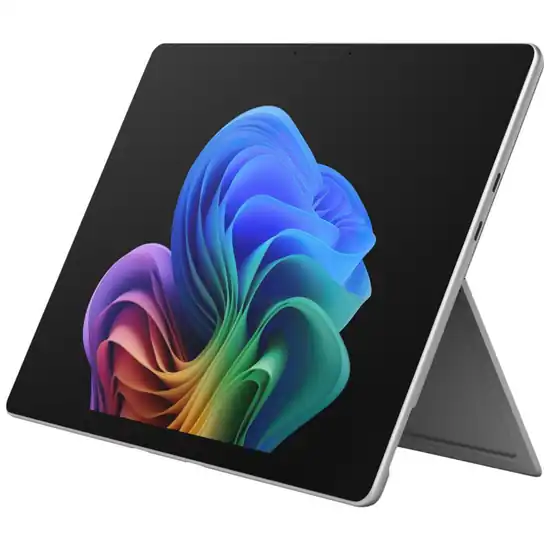
Microsoft Surface Pro 13-inch (12th Edition) Verdict
PIQSY's decision-led verdict on Surface Pro 13-inch 12th Edition EP2-73228: when the larger Windows workspace, USB4 and removable SSD justify its weight and separate accessories.
Australian model checkedEP2-73228
Best fit
- Desk-heavy Windows productivity
- USB4 docking and peripherals
- Larger 3:2 workspace
Skip if
- Low tablet weight is a priority
- OLED is required on the exact model
- A detachable form adds little to the workflow
Biggest reason to buy
The 13-inch 120Hz Windows workspace, USB4, Surface Connect and removable SSD make this the stronger desk-oriented Surface.
Main compromise
The tablet weighs 895g before keyboard, the version we checked is LCD rather than OLED, and keyboard and pen remain separate purchases.
Last checked price
$2,699 AUD
What matters
Why it earns consideration — and why you might skip it.
Who it fits
The Surface Pro 13-inch is for buyers who want a tablet-shaped Windows PC but prioritise workspace, docking and storage serviceability over handheld portability. PIQSY's Australian reference is EP2-73228: Snapdragon X2 Plus 10 Core, LCD, Platinum, 16GB RAM and 256GB SSD.
Its strongest fit is desk-heavy Windows productivity where a 13-inch 3:2 canvas, USB4 and removable storage matter more than holding the tablet for long periods.
Decision snapshot
Choose it for
- Full Windows desktop platform
- 13-inch 2880×1920 3:2 LCD with refresh up to 120Hz
- Snapdragon X2 Plus 10 Core
Know before buying
- 895g before keyboard
- Keyboard and Surface Slim Pen are separate purchases
- The exact EP2-73228 reference is LCD, not OLED
Retailer prices
Prices we've recently checked.
We keep retailer prices separate from product fit. Different retailers and marketplace sellers can show different prices, and prices and availability can change. Check the retailer before buying.
The Good Guys
$2,699
PIQSY price context
Around its recent price
Close to what we've recorded over recent weeks.
What changes the decision
The exact base reference is LCD, not OLED
Microsoft's Surface Pro 13 family includes OLED options at higher X2 Elite tiers, but PIQSY's EP2-73228 reference is a 13-inch 2880×1920 PixelSense LCD with 3:2 aspect ratio, up to 120Hz and 600 nits typical brightness.
That distinction matters. A buyer specifically paying for OLED contrast should not assume it is present because the broader Surface Pro family advertises OLED configurations.
The larger canvas is the primary upgrade over Surface Pro 12
The 13-inch model provides materially more working area than the 12-inch Surface. For spreadsheets, split windows, desktop browser work and keyboard-led productivity, the extra space can justify the larger chassis.
The trade-off is 895g before the keyboard, versus 686g for Surface Pro 12. Buyers who frequently use the device handheld should give that 209g gap real weight.
USB4 and Surface Connect make this the stronger docked Surface
The model provides two USB-C / USB4 ports, Surface Connect and a keyboard connector. That is a stronger high-bandwidth peripheral and docking foundation than Surface Pro 12's USB 3.2 architecture.
If external storage, displays or desk docking are recurring parts of the workflow, this is one of the clearest reasons to step up.
Removable storage and Snapdragon X2 Plus define the stronger desk platform
PIQSY's reference uses a 256GB removable Gen 4 SSD alongside Snapdragon X2 Plus 10 Core and 16GB LPDDR5x.
The removable SSD creates a more serviceable storage path than tablets with fixed soldered storage, while the stronger processor tier adds Windows headroom over the smaller Surface Pro 12 reference.
Neither point removes the need to check software compatibility. This remains ARM-based Windows, so specialist applications, drivers and older enterprise utilities should be verified when they are essential.
Accessories and 895g weight make the complete setup a deliberate commitment
The keyboard and Surface Slim Pen are not included. The box does include Microsoft's 39W power supply with Surface Connect plus documentation.
The tablet itself weighs 895g before keyboard, compared with 686g for Surface Pro 12. Add a keyboard and the package moves further toward laptop territory.
That does not make the design wrong; it makes the buyer's use pattern important. Desk, dock and keyboard-heavy work favour the 13-inch model. Frequent handheld use and travel favour the smaller Surface.
The extra 209g over Surface Pro 12 is therefore not an abstract specification difference. It is the physical price of gaining the larger canvas, stronger port architecture and more desk-oriented setup. Buyers who carry the device daily should give that trade real weight rather than assuming the larger model is automatically the safer choice.
Battery and owner feedback remain bounded
Microsoft states up to 15.5 hours local video playback or 11.5 hours active web use under its methodology. PIQSY treats those as manufacturer test claims rather than guaranteed real-world runtime.
The exact Good Guys EP2-73228 listing currently shows zero product reviews, so PIQSY does not infer owner consensus for battery life, thermals, reliability or everyday ergonomics.
The recommendation therefore stays anchored to Windows compatibility, workspace, ports, storage architecture and physical fit rather than popularity signals.
The exact Good Guys EP2-73228 listing currently shows zero product reviews, so PIQSY does not infer owner consensus for battery life, thermals, reliability or everyday ergonomics. The recommendation is built from exact hardware and requirement fit, not review volume.
Owner views
Owner feedback still developing
Owner feedback is still developing, so PIQSY is not presenting a consensus yet.
Who should choose something else
The Surface Pro 13 should lose when portability, tablet-first software or clamshell ergonomics matter more than its Windows workspace.
- Switch to the Surface Pro 12 when Windows remains mandatory but lower tablet weight and a smaller form matter more than USB4 and maximum workspace.
- Choose the iPad Pro M5 when premium tablet-first work and iPadOS fit the workflow better than Windows desktop compatibility.
- Choose a conventional laptop when the device will remain keyboard-led almost all the time and detachable touch/pen use is rarely valuable.
If OLED is mandatory, do not assume it is present on EP2-73228; compare the appropriate Surface tier instead.
PIQSY conclusion
Buy Surface Pro 13 when you need Windows and will genuinely use the larger 13-inch workspace, USB4 docking and removable SSD path. Those are meaningful capability upgrades over Surface Pro 12.
Skip it if low tablet weight is a priority, if you expect OLED on the base X2 Plus model, or if you have not verified essential specialist software for ARM Windows.
Its strongest case is not simply that it is the bigger Surface. It is that the bigger chassis unlocks a more desk-capable Windows tablet configuration.
Final decision
Ready to choose, or want one more check?
Buying options
Check the current offer.
$2,699 AUD
Prices and availability can change.
Quick answers
Frequently asked questions
Who is the Microsoft Surface Pro 13-inch (12th Edition) best for?
Desk-heavy Windows productivity
What should I compare first on the Microsoft Surface Pro 13-inch (12th Edition)?
The published Display figure PIQSY uses is 13-inch PixelSense LCD, 2880x1920, 3:2, up to 120Hz, 600 nits typical; OLED is a separate X2 Elite family tier. Treat it as one decision input alongside the practical trade-offs in the Verdict, not as a universal ranking.
When should I choose something else instead of the Microsoft Surface Pro 13-inch (12th Edition)?
Low tablet weight is a priority
What is PIQSY's short read on the Microsoft Surface Pro 13-inch (12th Edition)?
PIQSY's decision-led verdict on Surface Pro 13-inch 12th Edition Microsoft Surface Pro 13-inch (12th Edition): when the larger Windows workspace, USB4 and removable SSD justify its weight and separate accessories.
Technical detail
Specifications
See full specifications
| Platform | WINDOWS |
|---|---|
| Reference Pricing Configuration | Surface Pro 13-inch (12th Edition), EP2-73228, Snapdragon X2 Plus 10 Core, LCD, Platinum, 16GB RAM, 256GB SSD |
| Display | 13-inch PixelSense LCD, 2880x1920, 3:2, up to 120Hz, 600 nits typical; OLED is a separate X2 Elite family tier |
| Processor | Snapdragon X2 Plus 10 Core reference configuration |
| Memory | 16GB LPDDR5x reference configuration |
| Storage | 256GB removable Gen 4 SSD reference configuration |
| Weight | 895g |
| Ports | 2x USB-C / USB4 plus Surface Connect and keyboard port |
| Wireless | Wi-Fi 7 |
| Keyboard | Surface Pro 13-inch keyboards optional |
| Stylus | Surface Slim Pen supported; sold separately |
| Connectivity | Wi-Fi reference configuration |
| Pen Included | No |
| Keyboard Included | No |
| Battery | Microsoft test claim up to 15.5h local video playback / 11.5h active web use |
| Charger Included | Yes |
| Cameras | 1440p ultrawide front camera; 10MP rear |
| Owner Evidence | Exact Good Guys EP2-73228 page shows zero reviews at current audit; do not infer owner consensus |
Keep Exploring
Research provenance
See how PIQSY verified this recommendation.
Research provenance
See how PIQSY verified this recommendation.
How we checked this
How PIQSY checked this product
We checked the Australian model and dated manufacturer or retailer sources rather than borrowing specifications from an overseas variant.
Australian model checked
Surface Pro 13-inch (12th Edition), EP2-73228, Snapdragon X2 Plus 10 Core, LCD, Platinum, 16GB RAM, 256GB SSD
Model / identifier: EP2-73228
Sources used
Manufacturer · Australian retailer
Sources checked through 31 Aug 2026
Last checked
12 Sept 2026
Price checked 25 Oct 2026
Hands-on testing: PIQSY has not physically tested this product for this page unless hands-on testing is explicitly disclosed.
What we could and couldn’t verify: If specifications conflict, cannot be matched to the Australian variant or cannot be confirmed, we leave them unresolved rather than guessing. Owner feedback is shown only when we can attribute it to the product we checked.
See models and source details
Sources used
- Manufacturer · microsoft.com · checked 31 Aug 2026
- Manufacturer · microsoft.com · checked 31 Aug 2026
- Australian retailer · thegoodguys.com.au · checked 31 Aug 2026