
PIQSY Compare
Microsoft Surface Pro 12-inch (1st Edition) vs Microsoft Surface Pro 13-inch (12th Edition)
Compare Surface Pro 12 and Surface Pro 13 on portability, 3:2 display workspace, Snapdragon tier, USB4, storage serviceability, accessories and Windows workload fit.
The choice that matters
Choose the compact Surface for easy carrying.
Choose the larger Surface for more desk workspace.

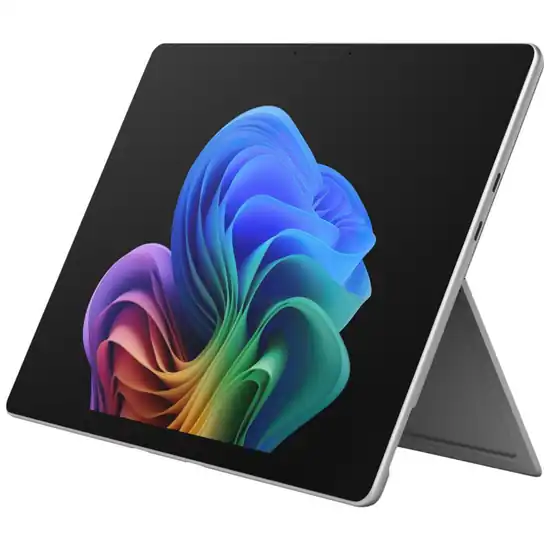
Decision snapshot
Start with how you’ll use it.
Microsoft
Microsoft Surface Pro 12-inch (1st Edition)
Best fit: Portable Windows 2-in-1
Biggest reason: Full Windows platform
Main compromise: Keyboard and pen separate
Last checked price
$1,589 AUD
Close to prices we've seen recently
Microsoft
Microsoft Surface Pro 13-inch (12th Edition)
Best fit: Desk-capable Windows tablet
Biggest reason: Full Windows platform
Main compromise: 895g before keyboard
Last checked price
$2,699 AUD
Close to prices we've seen recently
Key metrics
The measurable differences worth seeing side by side.
Bar length shows relative stated magnitude only. It is not a quality score or PIQSY rating.
Screen size
12 in
13 in
Weight
686 g
895 g
Key differences
The key differences at a glance.
These confirmed specifications differ. The advice below explains which ones matter for your needs.
12-inch PixelSense LCD, 2196x1464, 3:2, up to 90Hz, 400 nits typical
13-inch PixelSense LCD, 2880x1920, 3:2, up to 120Hz, 600 nits typical; OLED is a separate X2 Elite family tier
Snapdragon X Plus 8 Core
Snapdragon X2 Plus 10 Core reference configuration
256GB reference configuration
256GB removable Gen 4 SSD reference configuration
686g
895g
2x USB-C / USB 3.2; DisplayPort support
2x USB-C / USB4 plus Surface Connect and keyboard port
Wi-Fi 7; Bluetooth 5.4
Wi-Fi 7

What matters when choosing
What you'll actually notice
Both Surface Pros are ARM-based Windows detachables, but they solve different versions of the same portability-versus-capability problem. The Surface Pro 12 is the smaller, lighter device at 686g. The Surface Pro 13 moves to 895g and gives you a larger 13-inch 120Hz display, USB4, Surface Connect and a removable SSD on PIQSY's version reviewed here.
That means the 13-inch model is not a free upgrade. Before a keyboard is added, it is already 209g heavier. If the device will be held, carried between meetings or used frequently away from a desk, that difference can matter more than another inch of display.
The 13-inch earns its place when you repeatedly use the things the larger chassis enables: more desktop canvas, higher-refresh display, stronger processor tier, higher-bandwidth I/O or removable storage. If those capabilities are not solving a problem, Surface Pro 12 keeps full Windows in the easier package.
What changes the choice
How often will you carry it without a desk?
Surface Pro 12 weighs 686g. Surface Pro 13 weighs 895g, before keyboards.
What this means: a 209g difference is material in a shoulder bag and even more obvious when the tablet is held without a keyboard. Add the respective keyboard covers and both become heavier again.
Switch when: choose Surface Pro 12 when lower carried weight is a daily benefit. Choose Surface Pro 13 when the device will spend more time on a desk or table and the extra capability earns that weight.
Will the larger, faster display change your work?
Surface Pro 12 uses a 12-inch 2196×1464 3:2 LCD up to 90Hz. PIQSY's exact Surface Pro 13 reference uses a 13-inch 2880×1920 3:2 LCD up to 120Hz.
What this means: Surface Pro 13 gives you more physical workspace and a higher refresh ceiling, which can help with multi-window Windows use. The exact EP2-73228 reference is LCD, not OLED; OLED belongs to separate Surface Pro 13 family configurations.
Switch when: favour the 13-inch model when the larger desktop canvas is something you use throughout the day. Stay with 12 when the device's smaller size is more valuable than extra screen area.
Does the newer processor tier matter to your apps?
Surface Pro 12 uses Snapdragon X Plus 8 Core. Surface Pro 13 uses Snapdragon X2 Plus 10 Core on PIQSY's version reviewed here. Both have 16GB LPDDR5x memory.
What this means: Surface Pro 13 has the stronger hardware ceiling, but raw processor tier should not override software compatibility. Both are Snapdragon ARM Windows devices.
Switch when: choose 13 when your known workloads benefit from the higher hardware tier and you have verified the applications you depend on. Do not upgrade just because X2 is newer.
Is USB4 a real requirement?
Surface Pro 12 provides two USB-C / USB 3.2 ports with DisplayPort support. Surface Pro 13 provides two USB-C / USB4 ports, Surface Connect and its keyboard connector.
What this means: Surface Pro 13 is the better-choice for repeated docking, higher-bandwidth external storage and more demanding peripheral setups. Surface Pro 12 still covers simpler USB-C accessories and displays.
Switch when: move to 13 when USB4 or Surface Connect is part of the setup you will actually use. Stay with 12 if USB 3.2 already covers your peripherals.
Do you value removable storage serviceability?
The Surface Pro 12 reference uses 256GB storage. The Surface Pro 13 reference uses a 256GB removable Gen 4 SSD.
What this means: Surface Pro 13 gives you a clearer serviceability and upgrade path for storage. That matters to some long-term PC buyers, but not everyone intends to open or service their device.
Switch when: count removable SSD as a reason for 13 if serviceability or future storage replacement matters. Otherwise let it remain a secondary advantage.
What is actually in the box?
Neither version we checked includes its keyboard or Surface Slim Pen. Surface Pro 12 also does not include a power supply, while Surface Pro 13 includes a 39W Surface Connect power supply.
What this means: compare complete systems, not bare-tablet prices. A keyboard is important to many Windows workflows, and the charging setup differs between these exact references.
Switch when: include the accessories you genuinely need before deciding which model is better value at a given moment. Do not build evergreen fit around temporary price gaps.
Have you checked ARM Windows compatibility?
Both use Snapdragon ARM processors. Modern Windows compatibility is broad, but specialist legacy software, drivers and peripherals can still be workload-specific.
What this means: the most powerful Surface is still the wrong choice if a critical application or device does not work the way you need.
Switch when: verify exact specialist software and peripheral requirements before choosing either model. Treat that as a platform gate, not a minor specification.
Does owner feedback settle the choice?
Surface Pro 12 currently has a small exact retailer review pool with duplicate-purchaser concerns. Surface Pro 13 has no exact retailer reviews at the current audit.
What this means: the evidence base is not strong enough to turn owner sentiment into a quality score or comparison winner.
Switch when: do not switch. Use the documented hardware and workflow thresholds above; treat owner feedback as limited context.
The practical choice
Choose Surface Pro 12 when the reason for buying a Windows tablet is that it can travel more easily than a larger PC. Its 686g weight and smaller 12-inch footprint preserve that advantage while still giving you a 3:2 Windows workspace.
Choose Surface Pro 13 when the device will behave more like a detachable desk PC. The larger 120Hz display, USB4, Surface Connect, removable SSD and newer processor tier are more useful when the tablet spends meaningful time connected to peripherals and doing multi-window work.
The durable threshold is not "12 versus 13". It is whether portability or desk capability removes the bigger compromise in your routine.
When to choose Surface Pro 12
- 686g portability is materially important.
- A 12-inch 3:2 workspace is enough.
- USB 3.2 meets your peripheral requirements.
- You want full Windows in the smaller carry footprint.
When to choose Surface Pro 13
- The 13-inch 2880×1920 120Hz workspace will be used often.
- USB4 or Surface Connect matters for desk docking.
- Removable SSD serviceability is valuable.
- The newer X2 Plus processor tier justifies the 895g chassis.
Choose neither when
Choose neither until you have verified any specialist ARM Windows software, drivers or peripherals that your work depends on. If a critical application requires a different platform, processor compatibility matters more than the physical comparison.
Also consider a conventional laptop if keyboard use is nearly constant and tablet detachment is not providing a real benefit.
PIQSY conclusion
Choose Surface Pro 12 when portability is the hard constraint. Choose Surface Pro 13 when the larger 120Hz workspace, USB4 and removable SSD materially improve how you use Windows at a desk.
The 13-inch model is the more capable version we checked, but it is not automatically the better fit for a buyer who will feel the extra 209g every day.
Final choice
Choose the one that fits your needs.
Microsoft
Microsoft Surface Pro 12-inch (1st Edition)
Choose when: Portable Windows 2-in-1
Last checked price
$1,589 AUD
Close to prices we've seen recently
Microsoft
Microsoft Surface Pro 13-inch (12th Edition)
Choose when: Desk-capable Windows tablet
Last checked price
$2,699 AUD
Close to prices we've seen recently
Specifications
Compare the full specifications.
Specifications
Compare the full specifications.
Unverified
Unverified
Unverified
Unverified
Unverified
Unverified
WINDOWS
WINDOWS
Surface Pro 12-inch (1st Edition), EP2-27652, Snapdragon X Plus 8 Core, Platinum, Wi-Fi, 16GB RAM, 256GB storage
Surface Pro 13-inch (12th Edition), EP2-73228, Snapdragon X2 Plus 10 Core, LCD, Platinum, 16GB RAM, 256GB SSD
12-inch PixelSense LCD, 2196x1464, 3:2, up to 90Hz, 400 nits typical
13-inch PixelSense LCD, 2880x1920, 3:2, up to 120Hz, 600 nits typical; OLED is a separate X2 Elite family tier
Snapdragon X Plus 8 Core
Snapdragon X2 Plus 10 Core reference configuration
16GB LPDDR5x reference configuration
16GB LPDDR5x reference configuration
256GB reference configuration
256GB removable Gen 4 SSD reference configuration
686g
895g
2x USB-C / USB 3.2; DisplayPort support
2x USB-C / USB4 plus Surface Connect and keyboard port
Wi-Fi 7; Bluetooth 5.4
Wi-Fi 7
Surface Pro 12-inch Keyboard optional
Surface Pro 13-inch keyboards optional
Surface Slim Pen supported and sold separately
Surface Slim Pen supported; sold separately
Wi-Fi reference configuration
Wi-Fi reference configuration
No
No
No
No
Microsoft test claim up to 16h local video playback / 12h active web use
Microsoft test claim up to 15.5h local video playback / 11.5h active web use
No
Yes
Full HD front Surface Studio camera; 10MP rear
1440p ultrawide front camera; 10MP rear
Exact Good Guys EP2-27652 page shows 5.0/5 from 8 published verified-purchaser reviews; several entries are from the same purchaser/purchase and may be incentivised, so do not treat as eight independent owners
Exact Good Guys EP2-73228 page shows zero reviews at current audit; do not infer owner consensus
Still not clear?
Let your own priorities break the tie.
Keep Exploring
How we checked this
See the Australian models and sources PIQSY checked for this page.
How we checked this
See the Australian models and sources PIQSY checked for this page.
How we checked this
How PIQSY checked this page
We checked the Australian model and dated manufacturer or retailer sources rather than borrowing specifications from an overseas variant.
Australian model checked
2 Australian models checked
Sources used
Manufacturer · Australian retailer · Amazon AU
Sources checked through 31 Aug 2026
Last checked
12 Sept 2026
Current price and availability are checked separately where shown.
Hands-on testing: PIQSY has not physically tested this product for this page unless hands-on testing is explicitly disclosed.
What we could and couldn’t verify: If specifications conflict, cannot be matched to the Australian variant or cannot be confirmed, we leave them unresolved rather than guessing. Owner feedback is shown only when we can attribute it to the product we checked.
See models and source details
- Microsoft Surface Pro 12-inch (1st Edition): Surface Pro 12-inch (1st Edition), EP2-27652, Snapdragon X Plus 8 Core, Platinum, Wi-Fi, 16GB RAM, 256GB storage
- Microsoft Surface Pro 13-inch (12th Edition): Surface Pro 13-inch (12th Edition), EP2-73228, Snapdragon X2 Plus 10 Core, LCD, Platinum, 16GB RAM, 256GB SSD
Sources used
- Manufacturer · microsoft.com · Microsoft Surface Pro 12-inch (1st Edition) · checked 31 Aug 2026
- Manufacturer · microsoft.com · Microsoft Surface Pro 12-inch (1st Edition) · checked 31 Aug 2026
- Australian retailer · thegoodguys.com.au · Microsoft Surface Pro 12-inch (1st Edition) · checked 31 Aug 2026
- Amazon AU · amazon.com.au · Microsoft Surface Pro 12-inch (1st Edition) · checked 31 Aug 2026
- Manufacturer · microsoft.com · Microsoft Surface Pro 13-inch (12th Edition) · checked 31 Aug 2026
- Australian retailer · thegoodguys.com.au · Microsoft Surface Pro 13-inch (12th Edition) · checked 31 Aug 2026