
PIQSY Guide
Best Tablets for Work Australia: Platform Before Performance
Choose a work tablet by operating system, software compatibility, keyboard setup, display size, I/O and portability before comparing processor tiers.
The decision this guide answers
Which Tablet platform best fits a work workflow once desktop-app compatibility, keyboard requirements, portability, external displays and pen use are treated as hard constraints?
Start here
A work tablet is only useful if it runs the software, peripherals and workflows your job actually requires. That makes operating system and application compatibility the first decision; processor tier comes later.
A full Windows detachable, an iPad and an Android tablet can all be powerful. They are not interchangeable. If a corporate application, specialist driver, plug-in or desktop workflow is mandatory, settle that requirement before comparing displays or benchmark numbers.
PIQSY's current work shortlist covers six roles: Surface Pro 12 for portable full Windows, Surface Pro 13 for a larger Windows desk workflow, iPad Air M4 for high-capability mainstream iPad productivity, iPad Pro M5 for specialist Pro display/I/O work, Galaxy Tab S11 for portable DeX and S Pen productivity, and Lenovo Idea Tab Pro Gen 2 for a large matte Android workspace.

Portable full Windows
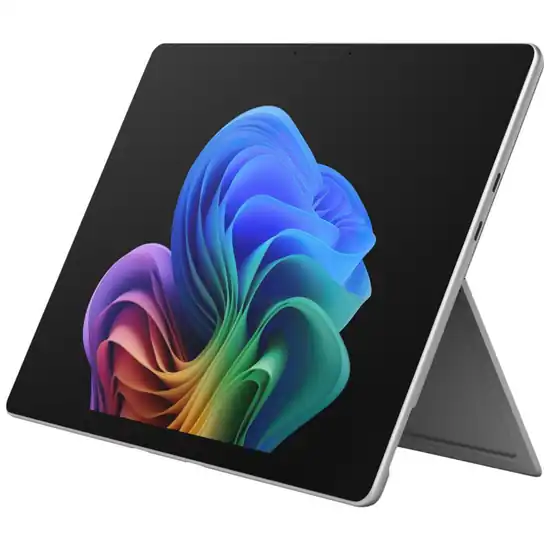
Microsoft Surface Pro 12-inch (1st Edition)Portable Windows 2-in-1 buyers who need desktop Windows applications
Larger Windows + USB4
Microsoft Surface Pro 13-inch (12th Edition)Windows 2-in-1 buyers who prioritise workspace, USB4 and higher performance headroom

Mainstream iPad productivity
Apple iPad Air (M4)iPad buyers who want a lighter productivity and creative step above the base iPad, especially when Pencil Pro, Apple Intelligence or stronger external-display workflows matter.

Pro display + I/O workflow
Apple iPad Pro (M5)Professional and enthusiast iPad buyers who can use the M5 platform, Tandem OLED display, Thunderbolt workflow, Pencil Pro or other Pro-specific capability rather than simply wanting the highest-tier iPad.

Portable DeX + S Pen
Samsung Galaxy Tab S11Android flagship buyers who specifically value Dynamic AMOLED 2X/120Hz display quality, stronger wired connectivity, Samsung DeX, bundled S Pen and IP68 durability in an 11-inch portable format.

Large matte Android workspace
Lenovo Idea Tab Pro Gen 2Students, creators and Android productivity buyers who want a large matte high-refresh workspace, substantially more performance headroom, Pen Plus in the exact package and expandable storage without moving to a premium OLED tablet.
What should you decide first?
Is full Windows software non-negotiable?
If yes, start with Surface.
Surface Pro 12 and Surface Pro 13 are the two full Windows routes in this shortlist. Both use Snapdragon ARM processors, so specialist legacy software, drivers and peripherals still need to be checked against the actual workload.
The key point is that Windows compatibility is a platform decision. An iPad Pro or Android flagship cannot solve a Windows-only application requirement by having a faster processor.
Is iPadOS already enough for the job?
If the required applications are available on iPadOS, iPad Air M4 is the sensible starting point for higher-capability work.
It gives you M4 performance, 12GB unified memory on the version we checked, Apple Pencil Pro support, USB 3 up to 10Gbps and one external display up to 6K60.
iPad Pro M5 raises the ceiling with Tandem OLED, ProMotion and Thunderbolt/USB 4. Those features should solve a real work requirement before they justify the step-up.
Can Android handle the workflow cleanly?
Galaxy Tab S11 and Idea Tab Pro Gen 2 can be strong work tablets when the required applications exist on Android.
S11 is the more portable premium route, with an 11-inch AMOLED 120Hz display, 12GB RAM, included S Pen, USB 3.2 Gen 1 and Samsung DeX.
Idea Tab Pro Gen 2 gives you a 13-inch matte 3.5K display, 12GB RAM, microSD, included Pen Plus and USB 5Gbps with DisplayPort-out.
The question is whether Android's app and windowing model suits the job. Hardware cannot fix a platform mismatch.
How much keyboard work will you do?
A work tablet is usually a system, not just a slate.
Neither Surface reference includes its keyboard or Slim Pen. Apple's Magic Keyboard and Pencil are separate. Galaxy Tab S11's S Pen is included, but a keyboard is not. Idea Tab Pro Gen 2 includes Pen Plus, while its keyboard is optional.
If you type for hours every day, compare the complete keyboard-equipped setup and ergonomics rather than the tablet-only price.
Which type fits you?
Surface Pro 12: portable full Windows
Choose Surface Pro 12 when full Windows is required but lower carried weight matters.
The version we checked weighs 686g before keyboard, uses a 12-inch 3:2 LCD up to 90Hz, Snapdragon X Plus 8 Core and 16GB RAM.
It has two USB-C / USB 3.2 ports with DisplayPort support. The power supply is not included on the version we checked.
Its value is straightforward: full Windows in the smaller Surface form factor.
Surface Pro 13: larger Windows desk workflow
Choose Surface Pro 13 when the device will spend more time at a desk and the larger workspace and I/O matter.
The exact EP2-73228 reference uses a 13-inch 2880×1920 120Hz LCD, Snapdragon X2 Plus 10 Core, 16GB RAM, USB4, Surface Connect and a removable 256GB Gen 4 SSD.
It weighs 895g before keyboard, so this is a capability-led step-up, not a free portability upgrade.
iPad Air M4: high-capability mainstream iPad work
Choose Air M4 when iPadOS covers the job and you want strong performance, Pencil Pro support and external-display capability without paying for Pro-only hardware.
The exact 11-inch Wi-Fi reference uses M4, 12GB unified memory, USB 3 up to 10Gbps and support for one external display up to 6K60.
Pencil and keyboard remain separate purchases.
iPad Pro M5: specialist display and high-bandwidth I/O
Choose Pro M5 when Tandem OLED/ProMotion, Thunderbolt or another Pro-specific capability is part of the work.
The exact 11-inch 256GB Wi-Fi standard-glass reference uses M5 with 12GB unified memory and Thunderbolt/USB 4 up to 40Gbps.
Do not move to Pro simply because it is the highest iPad tier. If Air already meets the workflow, the specialist ceiling may remain unused.
Galaxy Tab S11: portable Android productivity
Choose S11 when Samsung DeX, included S Pen, expandable storage and a premium portable display fit the job.
The exact 12GB/256GB Wi-Fi reference uses an 11-inch Dynamic AMOLED 2X 120Hz display, USB 3.2 Gen 1 and DeX.
It is a strong Android desk-and-mobile hybrid when Android applications cover the required work.
Lenovo Idea Tab Pro Gen 2: large matte Android workspace
Choose Lenovo when a large screen, pen-led work and expandable storage matter more than compactness.
The exact package combines a 13-inch matte 3.5K 144Hz screen, Snapdragon 8s Gen 4, 12GB RAM, 256GB storage, microSD, Pen Plus and DisplayPort-out.
At around 598g before any keyboard, it sits between the 11-inch tablets and the heavier Surface Pro 13.
What changes the decision?
Do you need USB4 or fast external storage?
Surface Pro 13 and iPad Pro M5 have the strongest high-bandwidth I/O stories here. Air M4, S11 and Idea Tab Pro Gen 2 also offer stronger-than-basic USB capabilities.
If your job involves repeated large transfers, external displays or demanding docks, I/O can change the decision. If you mostly use cloud apps and charging, it should matter less.
Is a large screen worth the carrying cost?
Surface Pro 13 and Idea Tab Pro Gen 2 give you more workspace. Surface Pro 12, iPad Air, iPad Pro 11-inch and Galaxy Tab S11 are easier to carry.
The best work tablet is not the one with the biggest screen. It is the one whose screen size you will actually take with you.
Do you need a pen?
Galaxy Tab S11 and Idea Tab Pro Gen 2 include their pens. Apple Pencil Pro and Surface Slim Pen are separate.
If handwriting, signing or annotation is central, include the exact pen setup in the total cost and workflow comparison.
What matters less than you might think
The highest processor tier cannot compensate for the wrong operating system.
A premium OLED display is also secondary if the required corporate application will not run.
And detachable design should not be assumed to improve work if the keyboard is used 95% of the time. A conventional laptop can be the better tool when tablet mode provides little value.
Common buying mistakes
- Choosing processor performance before checking software compatibility.
- Assuming ARM Windows runs every specialist legacy application or driver without verification.
- Comparing tablet-only prices when a keyboard is mandatory.
- Assuming pen support means the pen is included.
- Buying iPad Pro for prestige rather than a Pro-specific requirement.
- Treating Samsung DeX as equivalent to Windows desktop software.
- Choosing a 13-inch device without considering travel weight.
- Assuming every USB-C port offers USB4 or high-bandwidth docking.
- Buying a tablet when a conventional laptop better matches constant keyboard use.
Where should you go next?
If Windows is required, compare Surface Pro 12 vs Surface Pro 13 and decide whether 209g of extra tablet weight is worth the larger 120Hz workspace, USB4 and removable SSD.
If iPadOS is enough, compare iPad Air M4 vs iPad Pro M5 and identify the Pro-only feature you would use.
If Android is the route, open the Galaxy Tab S11 and Idea Tab Pro Gen 2 Verdicts and decide whether portability or a large matte workspace matters more.
Then price the complete work setup, including keyboard, pen, storage and dock requirements—not just the tablet.
Compare the closest choices
Move from the format to the actual product decision.
Apply what you learned
Turn the trade-off into a shortlist that fits you.
Keep Exploring
How we checked this
See the Australian models and sources PIQSY checked for this page.
How we checked this
See the Australian models and sources PIQSY checked for this page.
How we checked this
How PIQSY checked this page
We checked the Australian model and dated manufacturer or retailer sources rather than borrowing specifications from an overseas variant.
Australian model checked
6 Australian models checked
Sources used
Manufacturer · Australian retailer · Amazon AU
Sources checked through 1 Sept 2026
Last checked
2 Sept 2026
Current price and availability are checked separately where shown.
Hands-on testing: PIQSY has not physically tested this product for this page unless hands-on testing is explicitly disclosed.
What we could and couldn’t verify: If specifications conflict, cannot be matched to the Australian variant or cannot be confirmed, we leave them unresolved rather than guessing. Owner feedback is shown only when we can attribute it to the product we checked.
See models and source details
- Samsung Galaxy Tab S11: SM-X730NZAEXSA, 11.0-inch, 12GB/256GB, Wi-Fi, Grey
- Apple iPad Air (M4): 11-inch 128GB Wi-Fi Space Grey
- Apple iPad Pro (M5): MDWK4X/A, 11-inch, 256GB, Wi-Fi, Space Black, standard glass
- Lenovo Idea Tab Pro Gen 2: ZAHD0096AU, 13-inch 3.5K matte/paper-like, 12GB/256GB Wi-Fi, Luna Grey, exact AU package with Lenovo Tab Pen Plus
- Microsoft Surface Pro 12-inch (1st Edition): Surface Pro 12-inch (1st Edition), EP2-27652, Snapdragon X Plus 8 Core, Platinum, Wi-Fi, 16GB RAM, 256GB storage
- Microsoft Surface Pro 13-inch (12th Edition): Surface Pro 13-inch (12th Edition), EP2-73228, Snapdragon X2 Plus 10 Core, LCD, Platinum, 16GB RAM, 256GB SSD
Sources used
- Manufacturer · samsung.com · Samsung Galaxy Tab S11 · checked 1 Sept 2026
- Manufacturer · samsung.com · Samsung Galaxy Tab S11 · checked 1 Sept 2026
- Australian retailer · thegoodguys.com.au · Samsung Galaxy Tab S11 · checked 1 Sept 2026
- Amazon AU · amazon.com.au · Samsung Galaxy Tab S11 · checked 1 Sept 2026
- Manufacturer · apple.com · Apple iPad Air (M4) · checked 31 Aug 2026
- Manufacturer · support.apple.com · Apple iPad Air (M4) · checked 31 Aug 2026
- Manufacturer · apple.com · Apple iPad Air (M4) · checked 31 Aug 2026
- Amazon AU · amazon.com.au · Apple iPad Air (M4) · checked 31 Aug 2026
- Australian retailer · thegoodguys.com.au · Apple iPad Air (M4) · checked 31 Aug 2026
- Manufacturer · apple.com · Apple iPad Pro (M5) · checked 31 Aug 2026
- Australian retailer · jbhifi.com.au · Apple iPad Pro (M5) · checked 31 Aug 2026
- Australian retailer · thegoodguys.com.au · Apple iPad Pro (M5) · checked 31 Aug 2026