
PIQSY Guide
Best Tablets for Reading and PDFs Australia
Choose a reading and PDF tablet by glare control, screen size, weight, annotation setup, storage and ecosystem rather than processor speed alone.
The decision this guide answers
Which tablet best fits long-form reading, PDFs and annotation when glare, screen size, portability and pen inclusion are separated?
Start here
For reading and PDFs, raw processor speed is rarely the first decision. Glare, aspect ratio, screen size, weight and annotation setup usually change the experience more.
A tablet that looks excellent in a store can become tiring if reflections are constant. A huge screen can make full-page PDFs easier to read but less comfortable to hold. A bundled pen can be valuable for study, while an optional pen may be perfectly fine for someone who mainly reads.
PIQSY's current shortlist covers five different routes: Lenovo Idea Tab 11 for a compact paper-like package, TCL NXTPAPER 11 Plus for a specialist low-glare display, Lenovo Idea Tab Pro Gen 2 for a large matte PDF workspace, iPad A16 for a mainstream iPadOS generalist, and Pixel Tablet for a conventional Android reading tablet with an optional shared-room dock role.

Compact paper-like reading + notes
Lenovo Idea Tab 11Students, readers and mainstream Android buyers who value a matte paper-like display, pen-in-package study workflow and expandable storage more than high-end performance.

Low-glare specialist
TCL NXTPAPER 11 PlusReading, PDF, study and note-taking buyers prioritising a low-glare paper-like display

Large matte PDF workspace
Lenovo Idea Tab Pro Gen 2Students, creators and Android productivity buyers who want a large matte high-refresh workspace, substantially more performance headroom, Pen Plus in the exact package and expandable storage without moving to a premium OLED tablet.

iPadOS generalist
Apple iPad (A16)Everyday Apple tablet buyers who prioritise a broad app ecosystem, straightforward study/media use and a lower entry price than iPad Air or Pro.
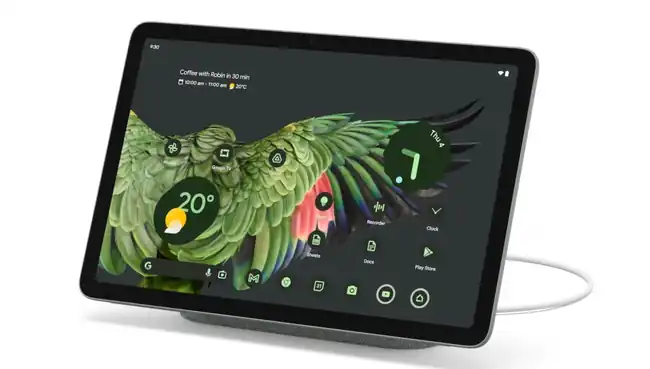
Android reading + optional dock role
Google Pixel TabletAndroid buyers who value a docked smart-home/display role as much as portable tablet use
What should you decide first?
Is glare a real problem in the places you read?
If you regularly read under overhead lights, near windows or in changing environments, screen treatment can matter more than a faster processor.
Lenovo Idea Tab 11 uses an 11-inch paper-like anti-glare display. Idea Tab Pro Gen 2 expands that idea to a 13-inch matte 3.5K 144Hz workspace. TCL NXTPAPER 11 Plus uses an 11.5-inch NXTPAPER 4.0 display positioned around reduced glare and paper-like viewing.
iPad A16 and Pixel Tablet are more conventional glossy-tablet routes. They can still be excellent reading devices, but they do not enter this shortlist because of a specialised low-glare treatment.
Do you read full-page documents or mostly articles and books?
Screen size changes the job.
An 11-inch-class tablet is easier to hold and carry. A 13-inch display can show a large PDF, textbook page or side-by-side reference with less zooming.
Idea Tab Pro Gen 2 gives you substantially more physical canvas, but at around 598g it is a larger device to hold. Idea Tab 11 is around 480g, TCL is around 490g, iPad A16 sits in the mainstream 11-inch class, and Pixel Tablet is about 493g.
Choose the bigger screen when it reduces repeated zooming and panning enough to justify the extra bulk.
Will you annotate often?
Idea Tab 11's exact Australian package includes Lenovo Tab Pen. Idea Tab Pro Gen 2 includes Lenovo Tab Pen Plus.
TCL supports T-Pen, but bundle inclusion varies by retailer. The exact Amazon AU bundle includes a T-Pen and flip case; that should not be assumed for every destination.
iPad A16 supports Apple Pencil, but the Pencil is separate. Pixel Tablet supports USI 2.0 stylus input, but it is not being positioned here as a bundled pen package.
If annotation is a weekly habit, compare the exact pen-ready configuration rather than treating all stylus support as equivalent.
Do you need removable storage?
Idea Tab 11 and Idea Tab Pro Gen 2 support microSD expansion. iPad A16 uses fixed internal storage. Pixel Tablet does not provide microSD, and the current TCL reference does not establish a removable-storage path.
For large offline PDF libraries, scanned documents or downloaded media, microSD can be useful. It does not improve RAM or application performance.
Which type fits you?
Lenovo Idea Tab 11: compact paper-like reading and notes
Choose Idea Tab 11 when you want an 11-inch tablet that puts glare reduction and annotation ahead of high-end performance.
The exact ZAFR0827AU package combines a 2560×1600 90Hz paper-like display, Lenovo Tab Pen, 128GB storage and microSD in a roughly 480g chassis.
Its main limitation is 4GB RAM, plus USB 2.0. That is a real ceiling for heavy multitasking, but it may matter little for reading, note-taking and ordinary study.
TCL NXTPAPER 11 Plus: display-first specialist
Choose TCL when the screen treatment itself is the reason for buying.
The 11.5-inch 2200×1440 NXTPAPER 4.0 display uses a 3:2 aspect ratio and supports refresh up to 120Hz. The 3:2 shape can be useful for documents and web pages because it gives you more vertical room than a very wide media-first screen.
The product uses 8GB RAM and 256GB storage on the current reference, but no microSD or cellular path is established. T-Pen inclusion depends on the exact retailer bundle.
Lenovo Idea Tab Pro Gen 2: large PDF and split-screen workspace
Choose Idea Tab Pro Gen 2 when full-page documents, side-by-side reference material and frequent annotation justify a bigger device.
The exact package uses a 13-inch 3504×2190 144Hz matte display, Snapdragon 8s Gen 4, 12GB RAM, 256GB storage, microSD and included Pen Plus.
At around 598g, it is better suited to a desk, stand or two-handed use than one-handed reading for long periods.
iPad A16: the ecosystem-led generalist
Choose iPad A16 when iPadOS apps, Apple services and a mainstream tablet role matter more than specialised low-glare hardware.
The exact 128GB Wi-Fi reference uses an 11-inch Liquid Retina display and supports Apple Pencil, but the Pencil is not included and storage is fixed.
It is the most straightforward route when reading is only one part of a broader Apple-tablet workload.
Pixel Tablet: conventional reading with a different shared-room role
Pixel Tablet uses a 10.95-inch 2560×1600 LCD, weighs around 493g and provides a mainstream Android reading experience.
Its unusual value is the optional Charging Speaker Dock, which can turn it into a docked smart-home and media surface. The dock is not included in the tablet-only reference.
The current Google Store Australia repair/spare-parts caveat is also relevant for buyers who put high value on a conventional local service path.
What changes the decision?
How much does aspect ratio matter?
A more document-friendly shape can reduce scrolling and make portrait reading feel more natural. TCL's 3:2 display is relevant here.
But aspect ratio should not override weight, glare or app ecosystem. A well-shaped screen on the wrong platform is still the wrong device.
Do you read for hours or in short sessions?
For long sessions, glare control and handling can become more important than peak performance.
For short reading sessions mixed with games, streaming and general apps, a conventional iPad or Pixel Tablet may be the better all-round choice even without a specialist paper-like surface.
Is the tablet mainly handheld or mostly supported?
If you read on a stand, at a desk or beside a keyboard, Idea Tab Pro Gen 2's large canvas can be excellent.
If you hold the tablet on a commute, on the sofa or in bed, an 11-inch-class device may be easier to live with.
The bigger model is not automatically better for PDFs if its weight discourages you from using it.
What matters less than you might think
A flagship processor rarely transforms PDF reading. Unless your documents are unusually complex or you multitask heavily, screen treatment and physical format usually matter more.
Very high refresh rates can make scrolling feel smoother, but they should not dominate a reading decision over glare, weight or annotation.
And a bundled stylus is only valuable when you annotate. If you mostly consume text, spend the budget on the screen, storage or ecosystem that matters more.
Common buying mistakes
- Choosing on processor speed rather than screen comfort.
- Buying a 13-inch tablet for one-handed reading.
- Assuming a paper-like display means e-ink-like behaviour; these remain conventional tablet displays.
- Assuming every TCL retail package includes the same pen and case.
- Treating microSD as extra RAM.
- Forgetting that Apple Pencil is separate on iPad A16.
- Ignoring fixed-storage limits before building a large offline library.
- Buying Pixel Tablet for its docked role without budgeting for the optional dock.
- Ignoring repair/support preferences on a device you expect to keep for years.
Where should you go next?
If glare is the primary problem, compare the Idea Tab 11, TCL NXTPAPER 11 Plus and Idea Tab Pro Gen 2 Verdicts and decide how much screen you want to carry.
If iPadOS is the requirement, open the iPad A16 Verdict and decide whether optional Pencil and fixed storage fit your reading and annotation habits.
If the Pixel's docked smart-home role is attractive, read its Verdict and evaluate the complete tablet-plus-dock setup rather than the tablet alone.
Then compare current price only after the display, size and annotation requirements are settled.
Apply what you learned
Turn the trade-off into a shortlist that fits you.
Keep Exploring
How we checked this
See the Australian models and sources PIQSY checked for this page.
How we checked this
See the Australian models and sources PIQSY checked for this page.
How we checked this
How PIQSY checked this page
We checked the Australian model and dated manufacturer or retailer sources rather than borrowing specifications from an overseas variant.
Australian model checked
5 Australian models checked
Sources used
Manufacturer · Australian retailer · Amazon AU
Sources checked through 31 Aug 2026
Last checked
2 Sept 2026
Current price and availability are checked separately where shown.
Hands-on testing: PIQSY has not physically tested this product for this page unless hands-on testing is explicitly disclosed.
What we could and couldn’t verify: If specifications conflict, cannot be matched to the Australian variant or cannot be confirmed, we leave them unresolved rather than guessing. Owner feedback is shown only when we can attribute it to the product we checked.
See models and source details
- Apple iPad (A16): MD3Y4X/A, 11-inch, 128GB, Wi-Fi, Silver
- Lenovo Idea Tab 11: ZAFR0827AU, 11-inch Paper-like 4GB/128GB Wi-Fi Luna Grey, exact AU retail package with Lenovo Tab Pen
- Lenovo Idea Tab Pro Gen 2: ZAHD0096AU, 13-inch 3.5K matte/paper-like, 12GB/256GB Wi-Fi, Luna Grey, exact AU package with Lenovo Tab Pen Plus
- Google Pixel Tablet: Pixel Tablet only, 128GB, Wi-Fi; Charging Speaker Dock is an optional separate/bundle configuration
- TCL NXTPAPER 11 Plus: 9469X2, 8GB/256GB Wi-Fi Dark Grey tablet; Amazon AU B0FGCSWMNX is an exact tablet bundle listing that includes flip case and T-Pen, so accessory inclusion is destination-specific
Sources used
- Manufacturer · apple.com · Apple iPad (A16) · checked 31 Aug 2026
- Manufacturer · apple.com · Apple iPad (A16) · checked 31 Aug 2026
- Australian retailer · thegoodguys.com.au · Apple iPad (A16) · checked 31 Aug 2026
- Amazon AU · amazon.com.au · Apple iPad (A16) · checked 31 Aug 2026
- Manufacturer · lenovo.com · Lenovo Idea Tab 11 · checked 31 Aug 2026
- Amazon AU · amazon.com.au · Lenovo Idea Tab 11 · checked 31 Aug 2026
- Australian retailer · thegoodguys.com.au · Lenovo Idea Tab 11 · checked 31 Aug 2026
- Manufacturer · lenovo.com · Lenovo Idea Tab Pro Gen 2 · checked 31 Aug 2026
- Manufacturer · psref.lenovo.com · Lenovo Idea Tab Pro Gen 2 · checked 31 Aug 2026
- Australian retailer · scorptec.com.au · Lenovo Idea Tab Pro Gen 2 · checked 31 Aug 2026
- Australian retailer · bigw.com.au · Lenovo Idea Tab Pro Gen 2 · checked 31 Aug 2026
- Amazon AU · amazon.com.au · Lenovo Idea Tab Pro Gen 2 · checked 31 Aug 2026