
PIQSY Guide
Best Large-Screen Tablets Australia: 13-Inch Workspaces Compared
Choose a 13-inch-class tablet by operating system, weight, pen setup, storage, I/O and desk workflow rather than assuming the largest or fastest model is automatically best.
The decision this guide answers
Which 13-inch-class Tablet priority model best fits Android study, Android performance or full Windows work?
Start here
A 13-inch-class tablet changes the ownership experience. You gain more room for split-screen work, large PDFs, timelines, documents and media, but you also move away from effortless one-handed use.
That trade-off should be intentional.
PIQSY's current large-screen shortlist has three distinct jobs: Lenovo Idea Tab Pro Gen 2 for large matte Android study and pen work, OnePlus Pad 3 for large-screen Android performance, and Surface Pro 13 for full Windows and a heavier desk-oriented workflow.

Large matte Android study
Lenovo Idea Tab Pro Gen 2Students, creators and Android productivity buyers who want a large matte high-refresh workspace, substantially more performance headroom, Pen Plus in the exact package and expandable storage without moving to a premium OLED tablet.

Large Android performance
OnePlus Pad 3Premium Android buyers who want a very large high-refresh workspace, flagship-class Snapdragon performance, 16GB/512GB capacity and strong media hardware, while accepting that pen and keyboard are separate purchases.
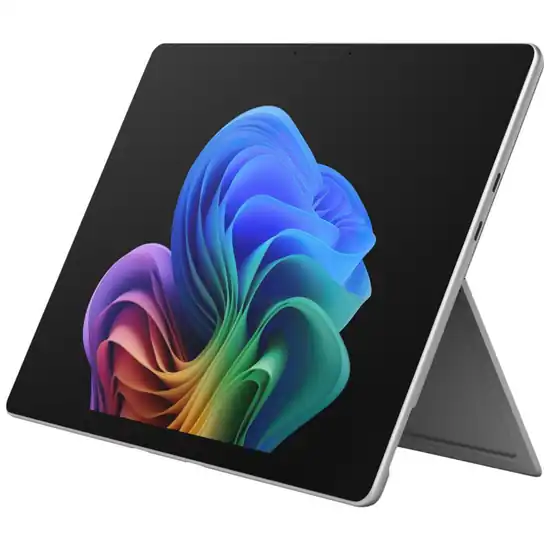
Full Windows workspace
Microsoft Surface Pro 13-inch (12th Edition)Windows 2-in-1 buyers who prioritise workspace, USB4 and higher performance headroom
What should you decide first?
Do you need Android or full Windows?
This is the first must-have requirement.
Lenovo Idea Tab Pro Gen 2 and OnePlus Pad 3 are Android tablets. They can handle sophisticated multitasking and external-display workflows, but they do not become Windows PCs because they have fast processors or large screens.
Surface Pro 13 runs full Windows. If desktop Windows software, corporate applications or specialist peripherals are mandatory, start there.
If Android covers the job, the decision becomes more about pen setup, storage, performance and physical handling.
How much weight are you willing to carry?
Idea Tab Pro Gen 2 is around 598g. OnePlus Pad 3 is 675g. Surface Pro 13 is 895g before keyboard.
That is a large spread.
The Lenovo is the easiest to justify for students and mobile users who still want a large canvas. OnePlus trades more weight for stronger performance and a larger 13.2-inch screen. Surface Pro 13 becomes much more laptop-like in mass before its keyboard is even attached.
A large screen is only productive when you are willing to carry it.
Is pen work central?
The exact Idea Tab Pro Gen 2 Australian package includes Lenovo Tab Pen Plus.
OnePlus Pad 3 supports Stylo 2, but the stylus is a separate purchase.
Surface Pro 13 supports Surface Slim Pen, but the pen and keyboard are separate.
If handwriting, annotation or drawing is part of the normal workflow, Lenovo has the cleanest exact-package story in this group.
Do you need removable storage or serviceable storage?
Idea Tab Pro Gen 2 supports microSD up to 2TB alongside 256GB internal storage.
OnePlus Pad 3 uses 512GB fixed internal storage on PIQSY's 16GB/512GB reference and does not provide microSD.
Surface Pro 13 uses a removable 256GB Gen 4 SSD on the version we checked. That is a different kind of serviceability from consumer microSD expansion.
Choose based on the storage problem you actually have: easy file-library expansion, more internal capacity, or PC-style serviceability.
Which type fits you?
Lenovo Idea Tab Pro Gen 2: large matte Android study and productivity
Choose Lenovo when the big screen is mainly for reading, annotation, split-screen study and Android productivity.
The exact ZAHD0096AU package uses a 13-inch 3504×2190 144Hz matte/paper-like display, Snapdragon 8s Gen 4, 12GB LPDDR5X memory, 256GB UFS 4.0 storage, microSD, Pen Plus and USB 5Gbps with DisplayPort-out.
At around 598g, it is the lightest of these three exact large-screen routes.
Its trade-offs are no native cellular, an IPS rather than OLED panel and an optional keyboard.
OnePlus Pad 3: maximum large Android headroom
Choose OnePlus when large-screen performance and internal storage matter more than pen inclusion or expandable storage.
PIQSY's reference uses a 13.2-inch 3392×2400 high-refresh display, Snapdragon 8 Elite, 16GB RAM and 512GB storage in a 675g chassis.
It also has a large battery and eight-speaker audio, making it a strong media-and-performance tablet.
The Stylo 2 and Smart Keyboard are separate, and microSD is not available. A separately verified 12GB/256GB sibling exists, but it does not replace this 16GB/512GB guide reference.
Surface Pro 13: full Windows workspace
Choose Surface Pro 13 when the reason for buying a large tablet is that it needs to behave like a detachable Windows PC.
The exact EP2-73228 reference uses a 13-inch 2880×1920 120Hz LCD, Snapdragon X2 Plus 10 Core, 16GB RAM, USB4, Surface Connect and a removable 256GB Gen 4 SSD.
The tablet weighs 895g before keyboard. Keyboard and Slim Pen remain separate.
That extra weight buys a very different software and I/O role from the Android tablets.
What changes the decision?
Does a matte screen matter more than raw performance?
Lenovo's matte/paper-like display is useful for reading and annotation. OnePlus has the stronger raw Android hardware ceiling.
If long PDF sessions and pen work dominate, Lenovo can be the better fit even though OnePlus has the faster processor.
If gaming, heavier Android multitasking and large-screen media dominate, OnePlus can earn the extra weight.
Do you need USB4?
Surface Pro 13 provides USB4 and Surface Connect. Lenovo provides USB 5Gbps with DisplayPort-out. OnePlus provides USB 3.2 Gen 1 / 5Gbps-class connectivity.
If high-bandwidth docks, external storage or PC-style peripherals are part of the normal setup, Surface has the strongest I/O case.
If you only need basic display output and file transfer, the Android options may already cover the job.
Will the tablet spend more time in your hands or on a desk?
This is the hidden large-screen question.
If it spends most of its time on a stand, desk or keyboard, 13 inches can be genuinely useful.
If you hold it for reading, travel with it daily or use it on public transport, a smaller tablet may be the better productivity device because you will actually carry and use it more often.
What matters less than you might think
A 0.2-inch screen difference between Lenovo and OnePlus matters much less than the weight, software, pen setup and storage architecture.
Processor generation also should not override operating system. Snapdragon 8 Elite cannot make OnePlus run Windows desktop software.
And large-screen tablets should not be ranked by one benchmark or battery number. Their value comes from the complete workflow.
Common buying mistakes
- Assuming 13 inches is automatically more productive.
- Ignoring tablet weight before adding a keyboard or case.
- Choosing Android when full Windows software is required.
- Assuming stylus support means the stylus is included.
- Treating 512GB fixed storage as equivalent to microSD expansion.
- Treating microSD as equivalent to a removable PC SSD.
- Paying for USB4 when the workflow never uses high-bandwidth peripherals.
- Buying a large screen for handheld reading when an 11-inch device would be easier.
- Comparing current prices before deciding which operating system and workflow qualify.
Where should you go next?
If Android is the platform, compare OnePlus Pad 3 vs Lenovo Yoga Tab Plus only if the accessory bundle becomes relevant, or use the Xiaomi Pad 7 vs Lenovo Idea Tab Pro Gen 2 comparison to decide whether the large Lenovo canvas is worth giving up portability.
For full Windows, read the Surface Pro 13 Verdict and compare it with Surface Pro 12 if carrying weight is a concern.
Then check the current price of the complete setup you would actually use, including keyboard and pen where needed.
Apply what you learned
Turn the trade-off into a shortlist that fits you.
Keep Exploring
How we checked this
See the Australian models and sources PIQSY checked for this page.
How we checked this
See the Australian models and sources PIQSY checked for this page.
How we checked this
How PIQSY checked this page
We checked the Australian model and dated manufacturer or retailer sources rather than borrowing specifications from an overseas variant.
Australian model checked
3 Australian models checked
Sources used
Manufacturer · Australian retailer · Amazon AU
Sources checked through 1 Sept 2026
Last checked
2 Sept 2026
Current price and availability are checked separately where shown.
Hands-on testing: PIQSY has not physically tested this product for this page unless hands-on testing is explicitly disclosed.
What we could and couldn’t verify: If specifications conflict, cannot be matched to the Australian variant or cannot be confirmed, we leave them unresolved rather than guessing. Owner feedback is shown only when we can attribute it to the product we checked.
See models and source details
- Lenovo Idea Tab Pro Gen 2: ZAHD0096AU, 13-inch 3.5K matte/paper-like, 12GB/256GB Wi-Fi, Luna Grey, exact AU package with Lenovo Tab Pen Plus
- OnePlus Pad 3: 16GB/512GB Storm Blue Wi-Fi
- Microsoft Surface Pro 13-inch (12th Edition): Surface Pro 13-inch (12th Edition), EP2-73228, Snapdragon X2 Plus 10 Core, LCD, Platinum, 16GB RAM, 256GB SSD
Sources used
- Manufacturer · lenovo.com · Lenovo Idea Tab Pro Gen 2 · checked 31 Aug 2026
- Manufacturer · psref.lenovo.com · Lenovo Idea Tab Pro Gen 2 · checked 31 Aug 2026
- Australian retailer · scorptec.com.au · Lenovo Idea Tab Pro Gen 2 · checked 31 Aug 2026
- Australian retailer · bigw.com.au · Lenovo Idea Tab Pro Gen 2 · checked 31 Aug 2026
- Amazon AU · amazon.com.au · Lenovo Idea Tab Pro Gen 2 · checked 31 Aug 2026
- Manufacturer · oneplus.com · OnePlus Pad 3 · checked 31 Aug 2026
- Manufacturer · oneplus.com · OnePlus Pad 3 · checked 31 Aug 2026
- Australian retailer · oneplusmobile.com.au · OnePlus Pad 3 · checked 31 Aug 2026
- Amazon AU · amazon.com.au · OnePlus Pad 3 · checked 31 Aug 2026
- Amazon AU · amazon.com.au · OnePlus Pad 3 · checked 1 Sept 2026
- Manufacturer · microsoft.com · Microsoft Surface Pro 13-inch (12th Edition) · checked 31 Aug 2026
- Manufacturer · microsoft.com · Microsoft Surface Pro 13-inch (12th Edition) · checked 31 Aug 2026